Thank you for commenting.
Here are the reference images and the exact prompt behind my bullet-time video.
Copy it, use it, and tag me when you post yours.
You need 3 things:
- A character sheet of you
- 4 object references
- Seedance 2.5 (on fal, Higgsfield, Dreamina or wherever you can access it)
Step 1: Make your character sheet
One image of you on a plain white background, in 4 panels: a face close-up, a full-body side view, a front view from the neck down, and a full-body back view.
Wear the exact outfit you want in the video. This sheet is how the AI keeps your face and clothes the same in every second.
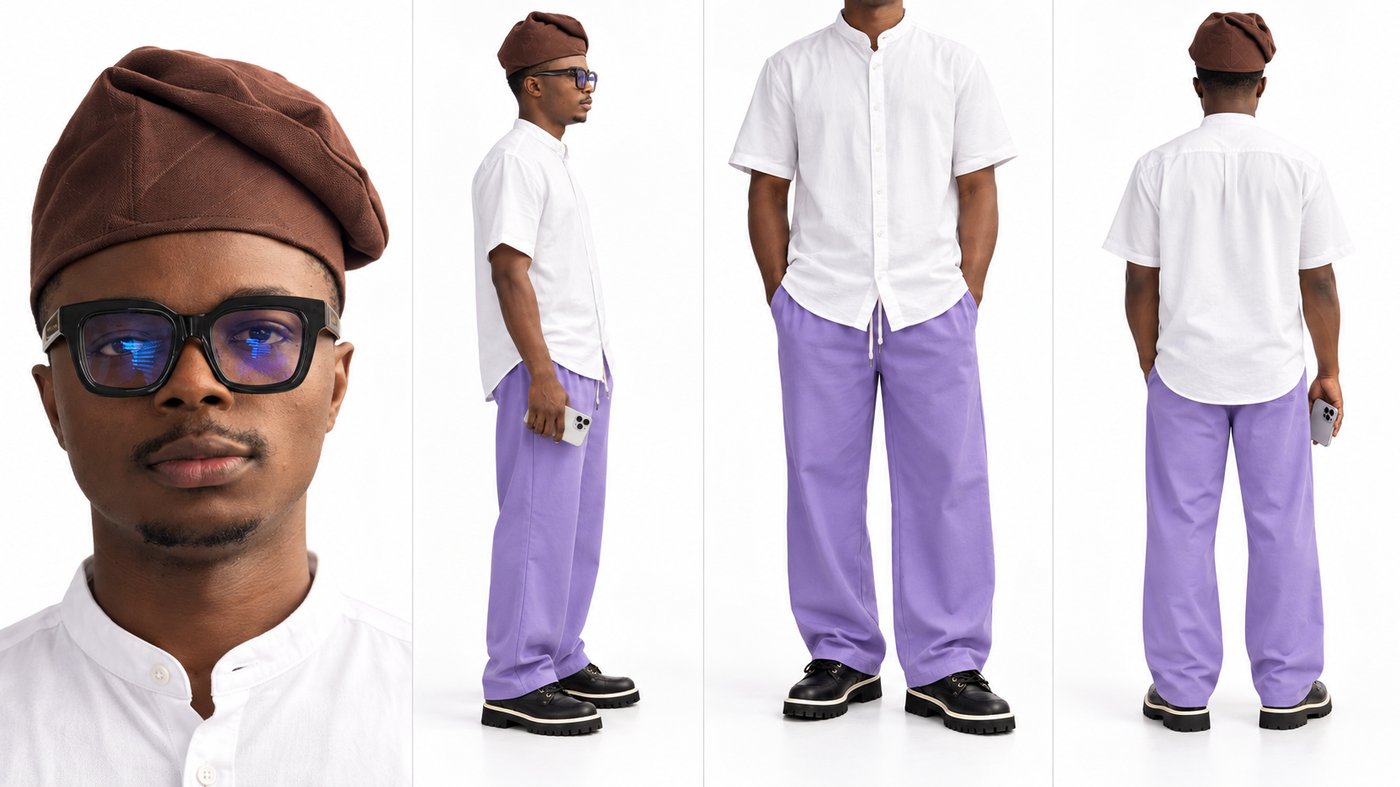
Paste this into GPT Image 2 or Nano Banana with your selfie and a photo of your outfit:
Create a character reference sheet of the person in my selfie. Seamless white background, soft even studio lighting. Four panels side by side, horizontal layout. Panel 1: an extreme close-up of the face, filling most of the frame. Panel 2: a full-body side profile, head to toe. Panel 3: a front view framed from the neck down, showing only the body and outfit. Panel 4: a full-body back view, head to toe. The face, hair and skin tone are identical to my selfie in every panel. The outfit is exactly the one in my outfit photo, same colours, same fabric. Neutral expression. No other people, no text, no props except what I uploaded.Step 2: Get your 4 object references
Each object gets its own clean image. These are mine:
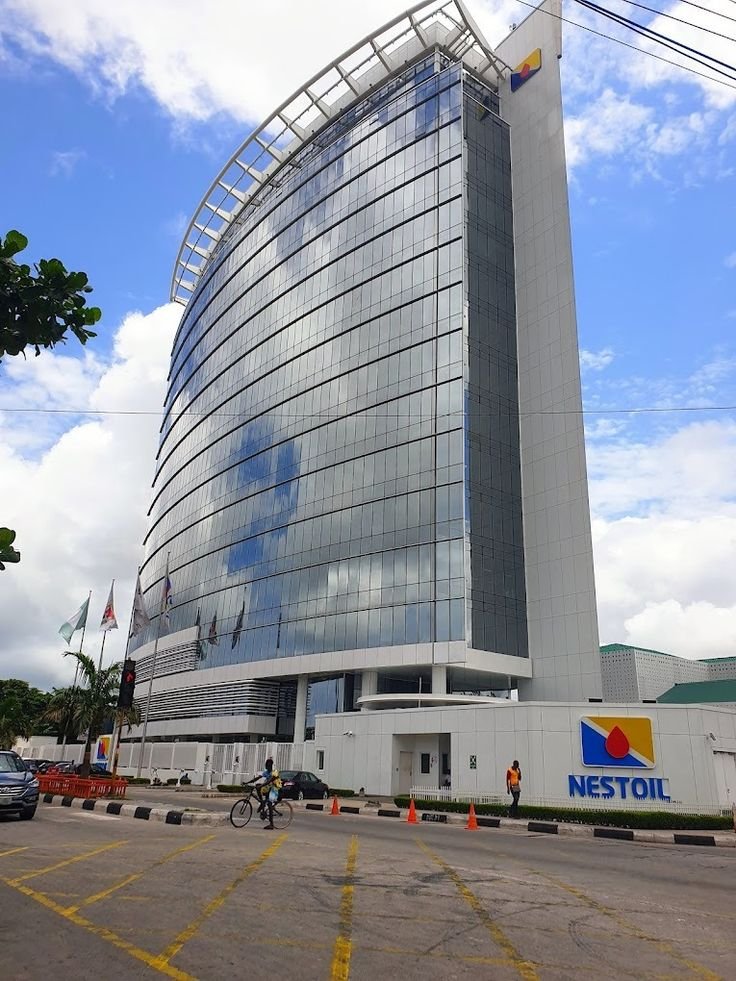
The location. A real street with a glass office tower.
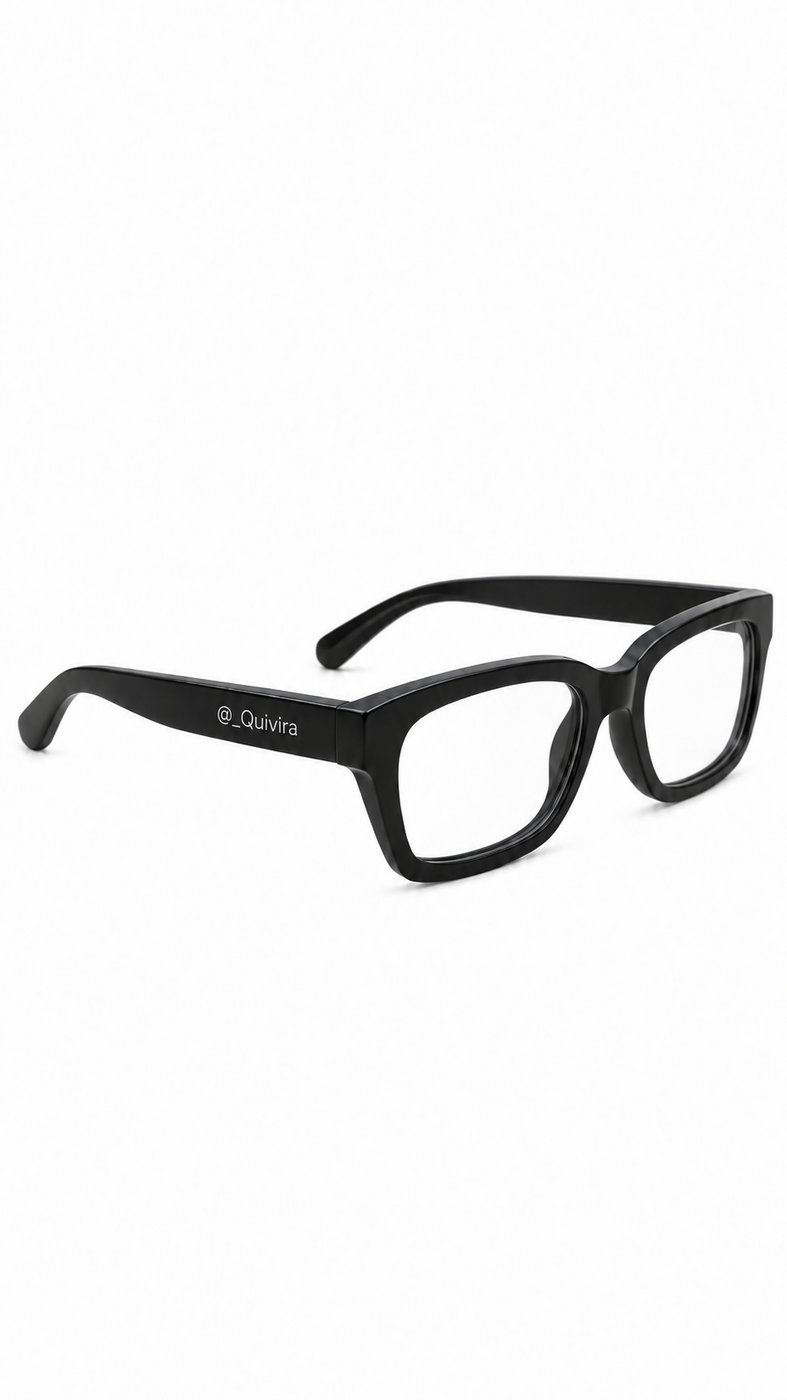
The glasses. Thick black frames with my handle on the arm.
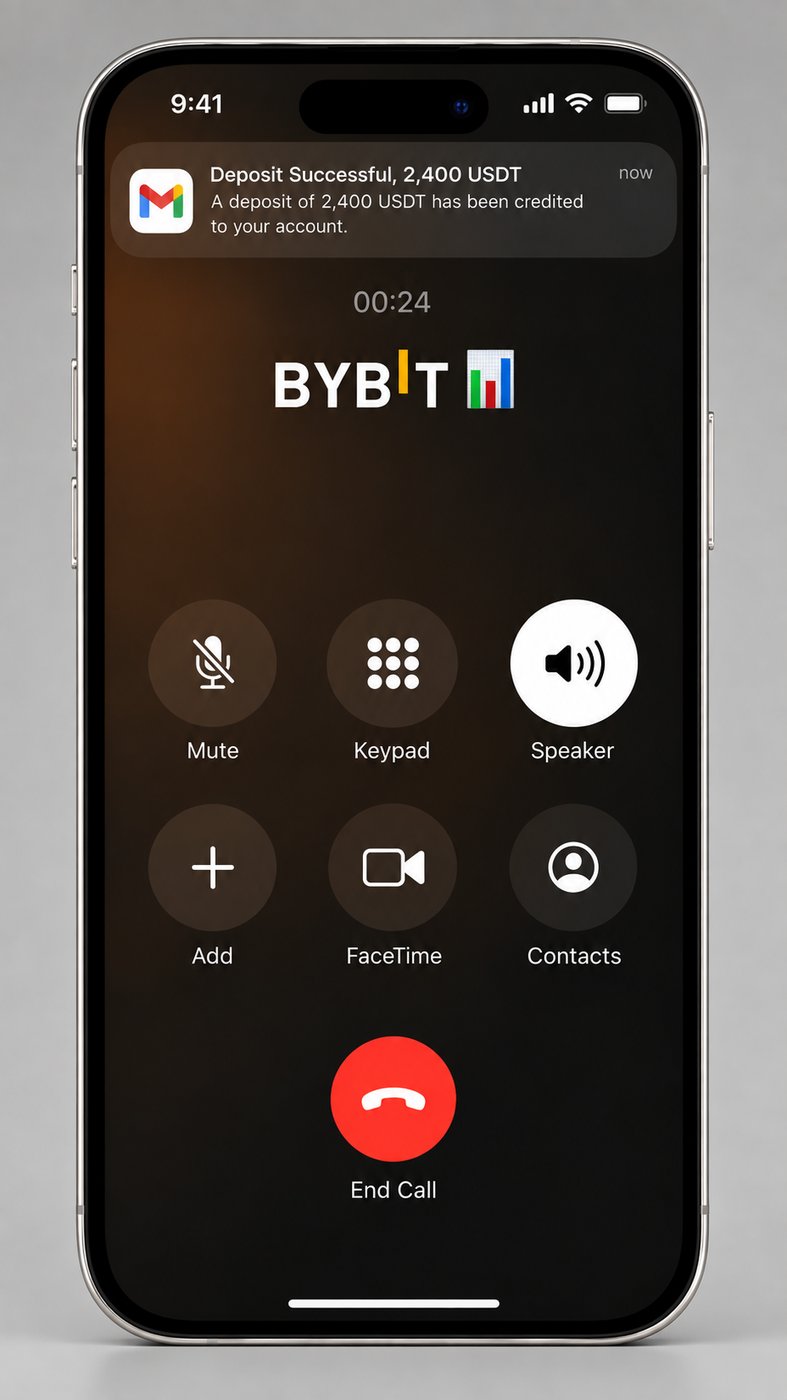
The phone. A made-up call screen. This screen is part of the film, it is not a real transaction.
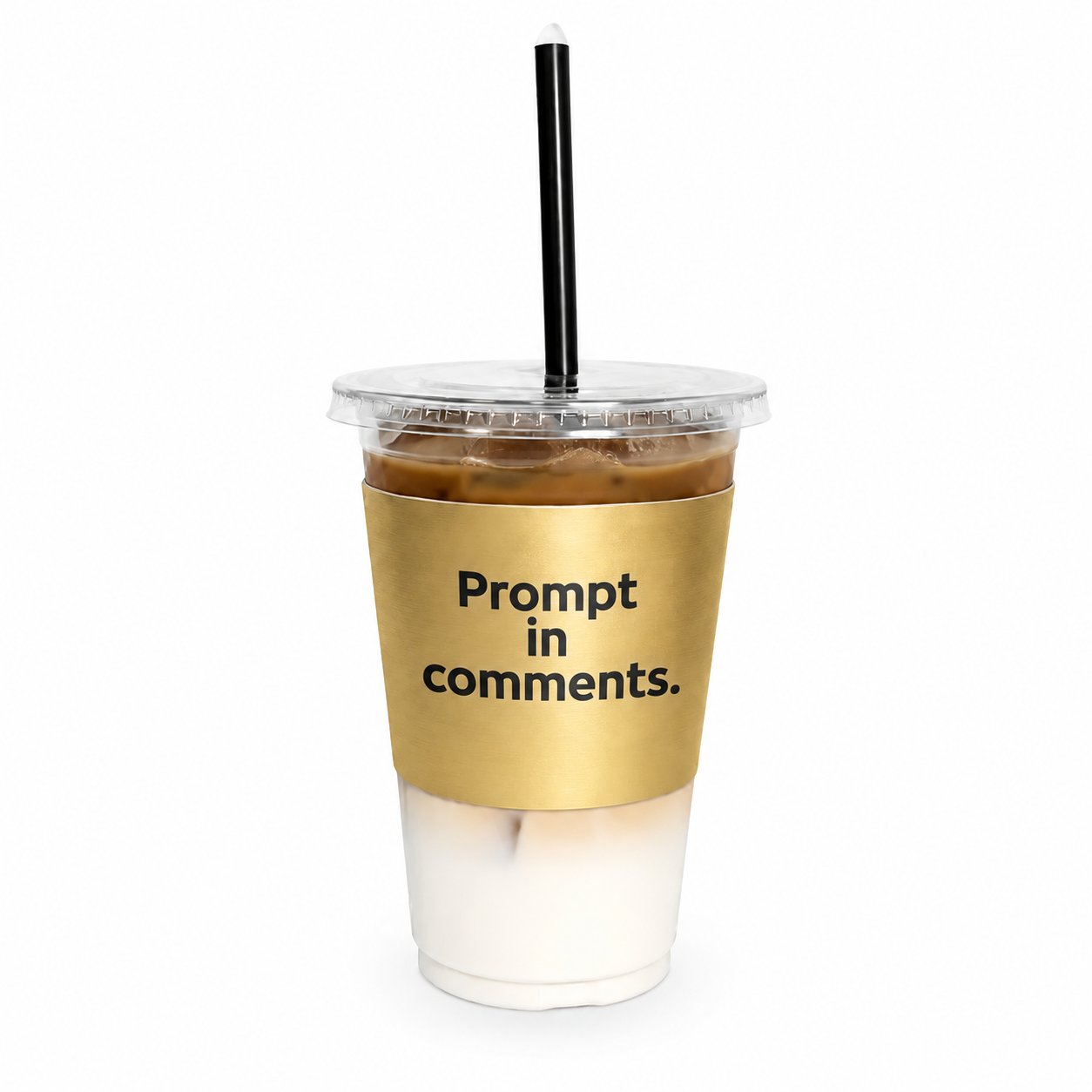
The coffee. A gold sleeve with my call to action printed on it.
Step 3: Run the prompt in Seedance 2.5
Upload the 5 images in this order: character sheet, location, glasses, phone, coffee.
Then paste the prompt. Swap my wardrobe line and my text for yours.
My settings: 9:16, 720p, 13 seconds.
@Image1 is the main character: face, build, skin tone and full outfit. Identity and wardrobe reference only. Do not copy its white background, its four-panel layout or its studio lighting.
@Image2 is the location reference: a Lagos street with a curved glass office tower. Do not copy its exact framing.
@Image3 is a pair of thick black rectangular glasses with "@_Quivira" printed in small white letters on the outer side of the left arm.
@Image4 is an iPhone in a live call. Its screen shows a notification banner at the top reading "Deposit Successful, 2,400 USDT" with the line "A deposit of 2,400 USDT has been credited to your account." below it, a call timer reading "00:24", and the word "BYBIT" in large white letters.
@Image5 is an iced coffee in a clear plastic cup with a black straw and a brushed gold sleeve printed in bold black letters on three lines: "Prompt", "in", "comments."

Vertical 9:16 format, continuous cinematic shot in one single take, photorealistic real-life footage, realistic physics, and strong spatial continuity.

Wardrobe of the main character, the same in every second: brown woven fila cap, white short-sleeved band-collar cotton shirt with white buttons, loose lilac drawstring trousers, black leather boots with thick cream lug soles.

0.0–2.5 s: Begins at the feet of the main character from @Image1 walking naturally through the urban environment inspired by @Image2. The camera smoothly tilts up along their body to a front close-up. The character holds @Image4 against one ear as if in conversation while naturally holding @Image5 in the other hand. @Image3 is worn naturally.
2.5–4.0 s: A rushed person approaches head-on carrying folders and loose papers, accidentally bumping into the main character. Papers scatter everywhere. The main character reacts with surprise, loses balance, and begins falling backward. @Image3, @Image4, and @Image5 separate clearly from the character due to the collision, following physically believable trajectories.
4.0–5.0 s: Time rapidly slows down into a dramatic bullet time effect. The character continues falling in extreme slow motion while the scattered papers and released objects remain suspended around them.
5.0–6.2 s: The camera moves closer to the suspended @Image3. It remains nearly frozen in its natural position in space, with a shallow depth of field and the falling character smoothly visible in the background. The left arm faces the camera and the white text "@_Quivira" on it is in sharp focus and spelled exactly.
6.2–7.4 s: The camera pans across the same frozen scene toward @Image4, visibly separated from the character. It preserves its exact appearance and displays its most recognizable front side toward the camera. The screen is lit and faces the lens squarely, in sharp focus and free of glare. The notification banner reads "Deposit Successful, 2,400 USDT", the line below it reads "A deposit of 2,400 USDT has been credited to your account.", and "BYBIT" is readable in the centre of the screen, every word spelled exactly as in @Image4.
7.4–8.8 s: The camera pans toward @Image5, suspended after being released from the character's hand. In extreme slow motion, any liquid or loose parts drift only microscopically in the frozen air, showing realistic surface tension, inertia, and material behavior. Nothing has hit the ground yet. The gold sleeve faces the camera and its black text "Prompt in comments." is in sharp focus and spelled exactly.
8.8–10.2 s: The camera pulls back to reveal the full frozen scene once more: the character falling, papers floating everywhere, and the three reference objects occupying their natural positions in space.
10.2–11.2 s: Time abruptly snaps back to normal speed. Gravity and momentum resume simultaneously. The character, papers, and released objects drop naturally to the ground from their current positions.
11.2–13.0 s: After hitting the pavement, the main character briefly remains on the ground. Nearby pedestrians react with surprise and look over, creating a natural aftermath moment before the shot ends.

Throughout the sequence, maintain the exact appearance of each reference object. All must originate from the character and separate visibly during the collision. They never appear spontaneously. During bullet time, objects remain anchored in space while the camera travels to them for close-ups. No duplicates, no teleportation, and no objects flying into the lens. Premium fashion film cinematography, realistic materials, natural lighting, shallow depth of field, and practical high-speed photography feel.

Text rule: the only readable text in the video is the text printed on @Image3, @Image4 and @Image5, copied letter for letter. The papers carry no readable writing. No subtitles, no captions, no watermark, no added titles.
The 8 rules I direct with
Turn off expansion. If your tool allows it, disable prompt expansion so you know what is actually being rendered.
Restate every shot. Don't say "same man". Repeat the face, clothes, location and lighting.
Direct the sound. Don't just say "Nigerian accent". Describe pitch, pace, rhythm and emotion.
Cut inside the prompt. Use instructions like "cut to close-up" or "cut to wide" instead of generating every angle separately.
Describe, don't argue. Don't say "keep the robot sharp this time". Say exactly what the camera should see.
Lock the voice. Give each character one voice description and reuse it exactly.
Verify the output. Check frame rate, resolution, duration and aspect ratio before editing.
Let the frame serve the shot. POV can be 9:16. CCTV can be 1:1. Wide shots can be 16:9.
Want the whole system?
This is one way to prompt AI out of many.
I'm putting all of it into my AI masterclass:
- How to write prompts AI actually understands
- The full creative director system I use
- How to make AI videos people pay for
It's free for the first 100 people.